JOBS
The Opportunities Board
Updated 07/26
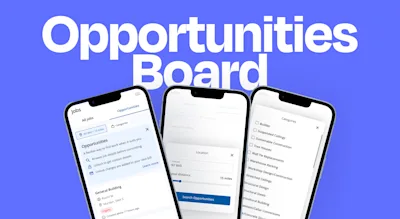
What is it?
The Opportunities Board is a live feed of local leads from customers who are looking for a tradesperson. Browse leads for free, review the details, and only pay when you choose to unlock one. Unlocking a lead gives you the customer's contact information instantly.

How it works
Set your location and categories Set your postcode, work radius and categories at the top of the page to see leads relevant to you.
Browse leads Each lead shows the job title, description, location, and photos where available. You'll also see the credit cost to unlock it before you commit to anything.
Unlock what you want Found a lead that fits? Use credits to unlock it. You'll get the customer's contact details instantly and the lead moves to your jobs list.
Pay upfront with credits Credits are purchased in advance — there's no end-of-month bill for the Opportunities Board. You buy a credit bundle, use credits to unlock leads, and only spend what you choose.
Credit bundles
Credits are sold in bundles of 10, 25, 50, or 100. The more you buy, the lower the cost per credit. Each lead shows its credit cost upfront before you unlock.
Credits are valid for 6 months from the date of purchase and do not roll over, so it's worth choosing a bundle size that matches how actively you plan to use the board.
From time to time, Checkatrade may add bonus credits to your account.
How to top up credits
Tap your credit balance in the top right of the app and select a bundle. Payment is taken upfront by card, Apple Pay, or Google Pay - you can save your card details for a faster checkout next time. You'll receive a receipt by email and your credits are available to use immediately.
Does this affect my existing monthly leads?
No. Your monthly lead allocation stays exactly the same. The Opportunities Board gives you access to additional leads that sit outside your lead plan — jobs you wouldn't otherwise receive. It's extra capacity on top, not a replacement.
Got a fixed or pay-as-you-go plan? Your monthly leads, search visibility, and direct customer contacts are all unchanged. The Opportunities Board is there when you want more and are only excess leads you wouldn’t have received anyway.
Got an Approved plan? Use the Opportunities Board to find jobs that fit your schedule and fill gaps in your diary.
Why opportunities disappear
A lead is removed when it's been unlocked by the maximum number of tradespeople, the customer closes the request, the lead expires, or you've already unlocked it.
Filters and notifications
Filter leads by location (postcode and radius) and job category. Opt in to receive a daily digest or real-time notifications for leads that match your trade and area.
Where to find it
In your Jobs section of the app, under the ‘Opportunities’ tab
FAQs
What types of leads get posted on the Opportunities Board?
Members on fixed and pay-as-you-go plans always get first access to new leads. Here's how the flow works:
New enquiries go directly to paying members first. If a customer’s lead still requires a tradesperson after a short delay — typically 4 hours — it's posted to the Opportunities Board. Where there are more leads than needed to meet monthly plan commitments, those are sent to the board immediately.
This means Opportunities Board leads are always additional to your monthly allocation, never a replacement for it.
What does "Unlock limit reached" mean?
Each lead can only be unlocked by a limited number of tradespeople. This keeps competition fair and makes sure customers aren't flooded with contact from too many trades at once. If you see this message, the lead has reached its maximum number of unlocks. Your credits have not been charged. Browse the board for other available leads in your area.
Can I get a refund if the lead doesn't convert?
When you unlock a lead, you're paying for the chance to quote — not a guaranteed job. Credits used to unlock a lead are not refunded on the basis of whether the customer goes ahead with the work.
However, if you think a lead is invalid — for example, the contact details are incorrect or it doesn't appear to be a genuine enquiry — please contact our team. We'll review it against our lead quality policy and return the credits where appropriate.
If you have a concern about a lead, raise it as soon as possible. We want to make sure every credit you spend is on a genuine opportunity.
How does the Opportunities Board compare to a Fixed Plan?
A Fixed Plan gives you a set number of leads each month, visibility in customer searches and direct calls as part of your membership fee. Those leads are unaffected by the Opportunities Board — they work exactly as they always have.
The Opportunities Board sits on top of your plan. Credits are purchased upfront in bundles, and you spend them only when you choose to unlock a lead. There's no monthly commitment and no end-of-period bill — you're in control of what you spend and when.
If you're on an Approved plan with no monthly lead allocation, the Opportunities Board is your primary way to find new work through Checkatrade.
What does "Opportunities unavailable" mean?
This means there are no leads available for you to unlock right now. This can happen if there are no current enquiries in your area or trade category, available leads have already reached their unlock limit, or there's something in your account settings that needs attention. New leads are added regularly, so it's worth checking back — or adjusting your location radius if you're not seeing much activity.
How do I check my credit balance?
Your current credit balance is shown in the top right of the app at all times. Tap it to top up or view your purchase history.
Do credits expire?
Yes. Credits are valid for 6 months from the date of purchase and do not roll over. If you have credits approaching expiry, it's worth checking the board for leads before they lapse. From time to time, Checkatrade may add bonus credits to your account — the same expiry terms apply.
What if I run out of credits?
Tap your credit balance in the top right of the app to buy a new bundle. Bundles of 10, 25, 50, and 100 credits are available, with a lower cost per credit on larger bundles. Payment is taken upfront by card, Apple Pay, or Google Pay, and credits are available immediately after purchase.
Still need support?
* Calls charged at local rate for BT customers, other service providers may charge more.