PAYMENTS
Paying a Tradesperson Through Checkatrade
Created 11/25
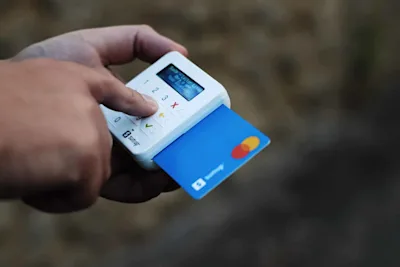
Checkatrade Pay makes paying for home repairs and improvements simple, safe and secure.
This guide explains how Checkatrade Pay works, how to make payments, how to spot genuine requests, what payment methods you can use — and how the Checkatrade Guarantee protects you if something goes wrong.

Here's all you need to know about paying a tradesperson through Checkatrade:
How do I pay?
You can pay via the Checkatrade payment link sent to you via email from the trade or by tapping your card on the trade’s phone if they have contactless payments enabled.
This registers your job and activates eligibility for the Checkatrade Guarantee automatically.
How to Pay a Tradesperson via Checkatrade
Paying through Checkatrade is fast, simple and secure.
Ask your tradesperson to pay via Checkatrade Pay. You can identify these by looking for the ‘Accepts Checkatrade Pay’ badge when searching for a tradesperson
Open the payment link your tradesperson sends you via email or in the chat
Check the payment amount matches what you expect
Tap Pay now
Pay using your debit or credit card, Apple Pay, Google Pay or Pay by Bank
That’s it — payment sorted. You’ll be emailed your receipt.
Benefits of using Checkatrade Pay
Enjoy a fast, seamless checkout with Apple Pay, Google Pay, Pay by Bank, or card payments at no extra cost
A convenient, safe and simple payment method that also makes it easier to qualify for the Checkatrade Guarantee*
Get an instant receipt after payment to stay on top of your job records
Used only by Checkatrade tradespeople that have passed up to 12 vetting checks
Who Can You Pay Via Checkatrade?
Trades who accept Checkatrade Pay will show the “Accepts Checkatrade Pay” badge on their profile.
We’re expanding this service, so more and more trades will become available over the coming months.
What Cards Can You Use?
You can pay using:
Visa debit or credit cards
Mastercard debit or credit cards
Pay by Bank
Goole Pay / Apple Pay
How Long Do You Have to Pay?
Your payment request will clearly show the due date.
You’ll get reminders before, on, and after this date to help you stay on track.
The Checkatrade Guarantee
For jobs completed on or after January 29th 2026, you're covered for up £1,000 for 6 months after the work is completed. For jobs completed before January 29th 2026, you're covered for 12 months up to £1,000.
You’ll be covered if you:
Contact the tradesperson via Checkatrade, and
Pay securely through Checkatrade Pay
*Eligibility criteria and T&Cs apply.
Payment Request Doesn’t Match the Quote?
If the amount looks different to what you agreed:
Check whether any additional work or materials were added
If you’re still unsure, message your tradesperson directly to clarify
It’s always best to resolve any confusion before making payment.
Do We Store Your Card Details?
Only if you choose to. You can save your card to your consumer account so that next time you checkout, your card is already there.
Your payment is processed securely through trusted, PCI-compliant systems.
Still need support?
* Calls charged at local rate for BT customers, other service providers may charge more.