QUESTIONS
Why is my wireless Flomasta thermostat not communicating to my boiler?
Updated 07/26
By: Laura Macdonald
Reviewed: Content Team
A wireless Flomasta thermostat talks to a receiver near your boiler using a radio signal, and when that link drops, it's usually one of a handful of common causes rather than a faulty unit. Working through them in order will solve most cases without needing to call anyone out.
What to check first, and why
What the receiver's indicator light is telling you
How to re-pair the thermostat and receiver
Why distance and interference can cause dropouts
Why a short delay isn't necessarily a fault
When it's time to call a heating engineer
Find a heating engineer near you
Start with the batteries
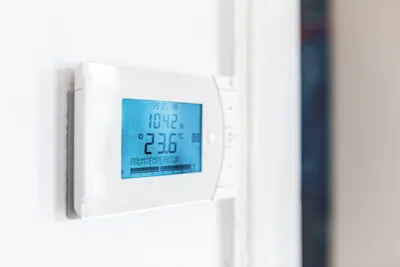
Being wireless, the thermostat itself runs on battery power, so a weak or dead battery is the most common cause of a lost connection. Replace them with fresh batteries of the type specified in your manual, and give the thermostat a minute or two to reconnect before assuming anything else is wrong.
If the thermostat's display looked dim, blank, or was behaving oddly before you noticed the fault, that's a strong sign the batteries were already on their way out.
Check the receiver's indicator light
The receiver unit, usually located near your boiler or heating control wiring centre, typically has an indicator light that tells you whether it's communicating properly:
Green usually indicates the receiver is paired and communicating with the thermostat.
Red (or no light at all) usually indicates it isn't receiving a signal properly.
If you see a red light, try turning the thermostat down to its lowest setting and then back up again. This forces it to send a fresh signal, which can be enough to re-establish the connection and switch the receiver's light back to green.
Re-pairing the thermostat and receiver
If cycling the temperature doesn't fix it, the thermostat and receiver may need re-pairing, sometimes called setting the "address" or "recognition" code. This process varies by exact Flomasta model, so you'll need your specific user manual for the steps, usually involving holding a button on the receiver until an indicator flashes, then confirming the pairing from the thermostat itself.
If you don't have a hard copy of the manual, search online using the exact model number, usually printed on the back of the thermostat or on the receiver casing, rather than just "Flomasta thermostat," to get the right instructions for your specific unit.
If you're setting up a new wireless thermostat rather than troubleshooting an existing one, our guide on connecting a wireless thermostat to your existing boiler covers the initial setup process.
Check distance and interference
Wireless thermostats and receivers communicate over radio frequency, and that signal can be disrupted by:
Distance: a thermostat placed far from the receiver, especially through thick stone or brick walls, can struggle to maintain a reliable connection.
Obstructions: metal cabinets or large appliances between the two units can block the signal.
Interference: other wireless devices on a similar frequency, including a neighbour's identical thermostat in an adjoining property, can occasionally interfere if the pairing code hasn't been set uniquely.
If you suspect this, try relocating the thermostat to a different spot in the room, or re-pairing it with a different recognition code if your model supports this, to rule out interference from a similar device nearby.
RF thermostats typically only check in with the receiver every minute or so, to save battery life, rather than communicating continuously. If you adjust the temperature and nothing happens immediately, give it a couple of minutes before assuming it's faulty.
On Checkatrade, you'll only find trades who meet our high standards and pass up to 12 checks.
When to call a heating engineer
If you've checked the batteries, the receiver's indicator light, re-paired the units, and ruled out distance or interference, and it's still not working, the fault may be with the wiring at the receiver itself or a failing internal component, both of which are best diagnosed by a professional rather than guessed at further.

Central heating engineer near me
Central heating engineers are important for keeping our homes warm and toasty throughout the year - as well as ensuring that our central heating systems are safe. Here's all you need to know.

Before you call an engineer
Frequently asked questions
A red light usually means the receiver isn't currently getting a signal from the thermostat. Try cycling the temperature, replacing the batteries, or re-pairing the units as a next step.
The exact steps vary by model, so you'll need the specific user manual, but it generally involves holding a button on the receiver until an indicator flashes, then confirming from the thermostat.
Occasionally, if you have an identical model on a similar frequency without a unique pairing code set. Re-pairing with a different recognition code, if your model supports it, can resolve this.
Wireless thermostats typically only communicate periodically (often every minute or so) rather than continuously, to preserve battery life. A short delay is normal rather than a fault.
Yes, briefly. Give the thermostat a minute or two to reconnect to the receiver after fresh batteries go in before troubleshooting further.
If batteries, the receiver light, re-pairing, and interference checks don't resolve it, the issue is likely wiring or an internal fault, which is worth having a heating engineer look at directly.
Related guides
Find a heating engineer near you
See the tradespeople we've checked for your job